Top 5 AI Coding Platforms Every Developer Should Use in 2026
We scored the five biggest AI coding platforms — Claude Code, Cursor, Codex, Copilot, and Replit — across five dimensions and ranked them #5 to #1. The twist: the whole field fits inside 1.1 points. There's no single winner, just a winner for how you build.
The video above ranks all five; below is how to actually choose between them.
The job changed underneath the tools#
A year ago, picking a coding assistant meant picking better autocomplete. That's not the decision anymore. The work itself moved: developers are spending less time writing lines and more time delegating whole tasks. You describe an outcome — "add rate limiting to the API," "fix this failing test" — and the agent plans it, edits the files, runs the suite, and opens the pull request. You review and merge.

This isn't a marketing slope. In a controlled GitHub study, developers given an AI assistant finished a build 55% faster — 1 hour 11 minutes against 2 hours 41 — on the exact same task. When a tool moves the needle that far, choosing the right one stops being a preference and starts being leverage. (New to "give it a goal and it finishes the job"? Two minutes here first: AI agents in 100 seconds.)
So the right question isn't "what's the best AI coder." It's "how much of that loop do I want the tool to run — and where do I want to be standing while it does?"
Five questions that actually separate them#
Every one of these tools can autocomplete a function. To tell them apart you have to score the things that don't show up in a 30-second demo. We used five, each out of 10, and averaged them for the overall:
- Agent Autonomy — how much of the plan-edit-test-ship loop it runs without you babysitting it.
- Code Quality — whether the output survives contact with a real codebase, not a toy snippet.
- Codebase Context — how much of your project it actually holds in its head at once.
- Workflow Fit — how little friction there is between thinking and shipping in the place you already work.
- Ecosystem & Value — reach, price, and how much capability you get per dollar.
Keep these five in mind as we go, because the ranking only makes sense once you see which column each tool wins.
The ranking, and the reason behind each placement#
I'll go #5 to #1 like the video, but the number matters less than the sentence after it — that's the part that tells you whether a tool is for you.
#5 · Replit — 7.9. Don't read "last" as "worst." Replit wins a race nobody else is really running: idea to a deployed, live URL without ever leaving the browser. No local setup, no environment to configure — its agent builds, runs, and ships to a real address. It scores lower on deep code quality and large-codebase context, and that's fine, because that's not its job. If you prototype, demo, or teach, this is the fastest zero-to-something on the list.
#4 · GitHub Copilot — 8.3. The pragmatist's pick. Its standalone agent is still chasing the leaders, so it doesn't top the autonomy column — but it's everywhere: every major editor, a real free tier, then $10/month. For most teams the honest question isn't "is there something better," it's "is anything else worth leaving the tool already wired into our editors and our wallet." On reach and value, nothing here touches it.
#3 · OpenAI Codex — 8.4. The one that works while you're asleep. Codex runs your code in a cloud sandbox and tops some of the hardest benchmarks, and its real trick is parallelism — hand it a stack of tasks and it grinds through them in the background. The trade is the mirror image of its strength: it's lighter inside the editor than tools built to live there. Reach for it when the job is "go do this," not "sit here and pair with me."
#2 · Cursor — 8.8. The tool developers live in. Cursor is a full AI-native editor that indexes your whole project, and its Composer agent edits across many files at once with the smoothest hands-on feel here. It's the sweet spot for people who want the agent's speed but their hands on the wheel — you're still driving, it's just doing the heavy typing. If you spend eight hours a day in an editor, this is the one that disappears into the work.
#1 · Claude Code — 9.0. The deep end. It's the strongest pure agent right now and the best code quality on the hardest benchmarks — it reasons across your entire codebase, asks clarifying questions before it charges off, and can run sub-agents in parallel from the terminal. The reason senior engineers reach for it isn't the leaderboard; it's that on genuinely hard, multi-file problems it's the one most likely to come back with something that actually holds up. It tops Agent Autonomy, Code Quality, and Codebase Context — the three columns that get harder, not easier, as the task gets serious.
Read the scorecard by column, not by row#
Here's the whole field at once. The instinct is to read down the overall column and crown a winner. The useful read is across — each tool owns a different lane.
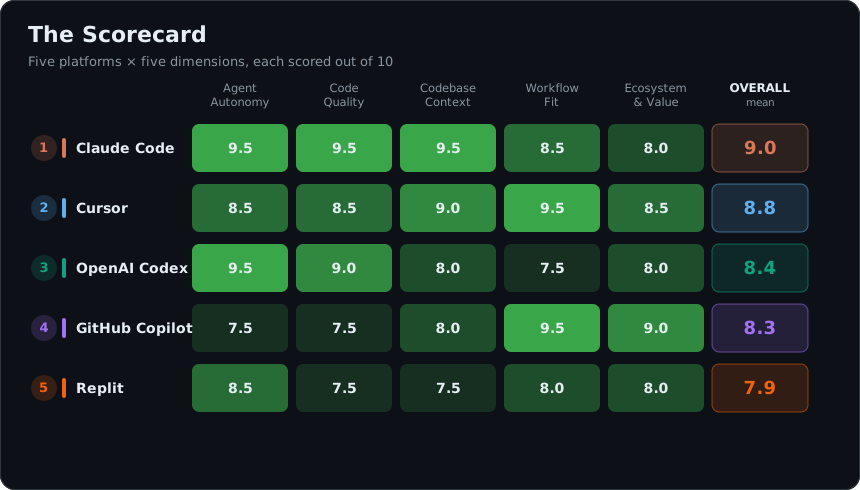
That last line is the whole game. There's no row that's green all the way across, and no row that's dark all the way across. You're not choosing a winner — you're choosing which column you can't afford to lose.
The three arguments people actually have#
Strip the scorecard down to the three things that start real debates on a team, and you get three different winners:
| What you're optimizing for | Winner | Why it takes the lane |
|---|---|---|
| Raw speed in the editor | Cursor | Tightest, lowest-friction hands-on loop |
| Price | GitHub Copilot | Free tier, then $10/month — nothing else is close |
| Security & control | Claude Code | Enterprise controls and zero data retention |
If three different tools win the three things people argue about most, "what's best" was never a real question. The real one is which of these three is the hill your project dies on.
The twist: the whole field is 1.1 points wide#
Now the part the ranking buries. Claude Code takes the crown — but the distance from #1 to #5 is just 1.1 points.
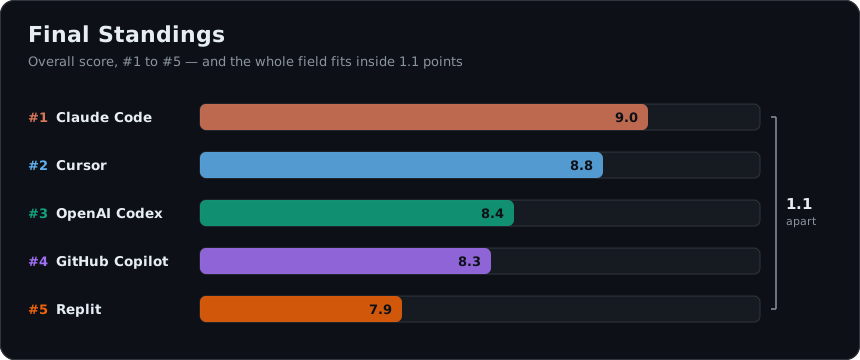
A 1.1-point spread across five tools means the gap between them is smaller than the gap between using any of them and using none. The leaderboard is real, but it's not a ladder where #1 dominates #5 — it's five strong tools that each peaked in a different place. Picking by the overall score is like buying a car by its top speed: technically a ranking, rarely the thing you needed.
So how do you actually choose?#
Forget "best." Answer one question — what does my day look like? — and the pick falls out:
- You ship hard, multi-file changes and review carefully → Claude Code. Pay for the column that gets harder as the work gets harder.
- You live in your editor all day and want flow, not a chat window → Cursor.
- You batch up tasks and want them done in the background → OpenAI Codex.
- You want the safe default that's everywhere and nearly free → GitHub Copilot.
- You need an idea to become a live app this afternoon → Replit.
Watch the full video
@thekernelcast on YouTube

Claude Fable 5: The Model Too Dangerous to Ship — Until Now
Anthropic just shipped Claude Fable 5 — the first public model in a new Mythos tier above Opus. It found 271 zero-days in Firefox, tops every coding benchmark, and costs 2× Opus. Here's what actually matters.
read the take→
AI Agent in 100 Seconds
AI agents explained in 100 seconds — from keyword-matching chatbots to autonomous, goal-completing systems. Same chat window, completely new engine.
read the take→
Top 5 AI Customer Support Platforms of 2026 (Ranked & Compared)
Choosing the right AI customer support platform isn't just about rankings—it's about finding the one that fits your business. In this video, we compare the top 5 AI customer support platforms of 2026, highlighting their strengths, use cases, and what makes each one stand out. Watch the full ranking to see which platform takes the #1 spot.
read the take→