CPU vs GPU vs TPU vs NPU vs LPU: What's the Difference?
Five chips, five names, five companies — and when it comes to AI, all of them are doing the same math. What actually differs is how each one does it. A plain-English tour of the CPU, GPU, TPU, NPU, and LPU, and the one idea that makes all five make sense.
There are five chips you keep hearing about: the CPU, the GPU, the TPU, the NPU, and the LPU. Different names, different companies, different jobs. Here's the surprising part — when it comes to AI, they're all doing the same math. What's different is how each one does it.
So let's look inside.
The one idea that makes all five make sense#
Before the chips, there's a single idea worth having. Once you've got it, every one of them falls into place.
Everything an AI model does comes down to two jobs.
The first is the math: multiplying huge grids of numbers together. And the multiplication itself is simple — there's just billions of it.
The second is moving those numbers around — because they don't live on the chip. They sit in memory, and every single one has to travel to the chip before any math can happen at all.
So picture a workshop, and a warehouse across town. The math is the work you do in the workshop. The moving is the driving back and forth.
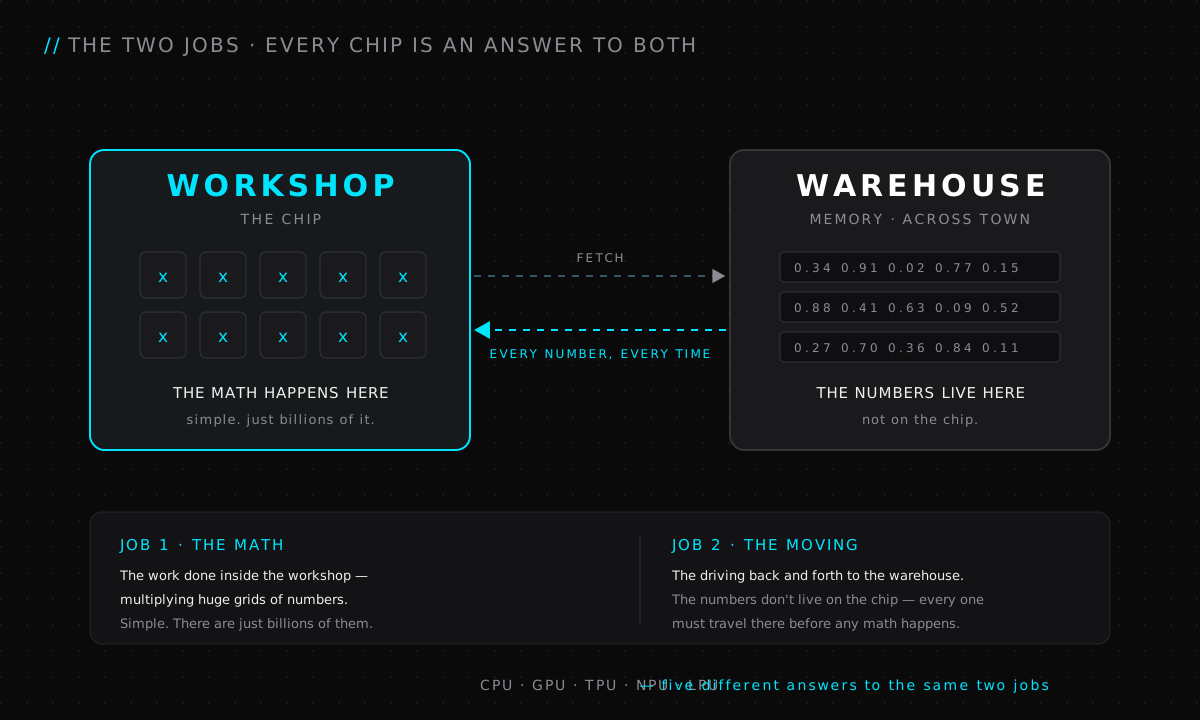
Every chip we're about to look at is just a different answer to those two jobs. Keep the image in your head — we'll come back to it four times.
CPU — Central Processing Unit#
Manages the overall system, prepares data, and coordinates LLM execution, but is too slow for large-scale model computation.

First, the CPU: the chip in every computer you've ever owned.
Open one up and you'll find a handful of workers inside. Each one is called a core — a worker that can take any job you give it and see it through on its own, start to finish. Your laptop probably has about eight. A big server chip might have sixty-four. And that's the whole point: a handful, not thousands.
Here's the part nobody mentions, though. Most of a CPU isn't doing math at all. Most of it is the machinery for working out what to do next. It reads an instruction, does it, then works out what follows — and it's always guessing what's coming, so it never sits idle. That machinery is expensive, and it's exactly what lets a CPU run absolutely anything.
Example: loading a web page. The CPU reads the page, runs its scripts, fetches the images, lays out the text — dozens of different little jobs, each one depending on the one before it. Perfect CPU work.
But ask it to color two million pixels at once, and a handful of clever cores becomes a queue.
GPU — Graphics Processing Unit#
The workhorse for training and serving LLMs by processing billions of model calculations in parallel.

So the CPU hands the heavy math to a chip built for exactly that: the GPU.
The G tells you what it was born for — graphics. Drawing the picture on your screen. Two million pixels, every one needing the same simple coloring step, sixty times a second. That's not a hundred different jobs. It's one tiny job, done millions of times over.
Now remember what a core was: a worker clever enough to take any job. That's expensive, so you only ever get a handful — and a handful of clever workers is exactly the wrong shape for millions of tiny repeats. For that, you want an enormous number of simple ones.
So the GPU makes a trade. Its workers can't take any job — each one only does the step it's told. In return, you get thousands of them instead of eight.
And here's the trick that makes thousands work: they don't each get their own instructions. One instruction is shouted at all of them at once, and every worker does that same step on its own scrap of data. No brain each. Just hands.
Example: one frame of a video game. Two million pixels, each needing the same lighting math. Thousands of workers each take one pixel, the same instruction lands on all of them — and the whole frame appears in one go, sixty times every second.
For twenty years, that's all this chip did: draw game worlds, one screenful at a time. Then someone noticed something.
Multiplying a grid of numbers is the same shape of work as coloring a grid of pixels. The same tiny step, repeated millions of times.
The chip built for graphics turned out to be exactly the chip AI needed. That accident is the entire AI boom.
TPU — Tensor Processing Unit#
A specialized AI accelerator built to train and run LLMs faster and more efficiently, especially in Google Cloud.
The GPU is fast because it has thousands of workers. But those workers still wait for instructions — shout, work, shout, work.
Google ran the same math billions of times a day and asked an obvious question: if the job never changes, why keep giving instructions at all?
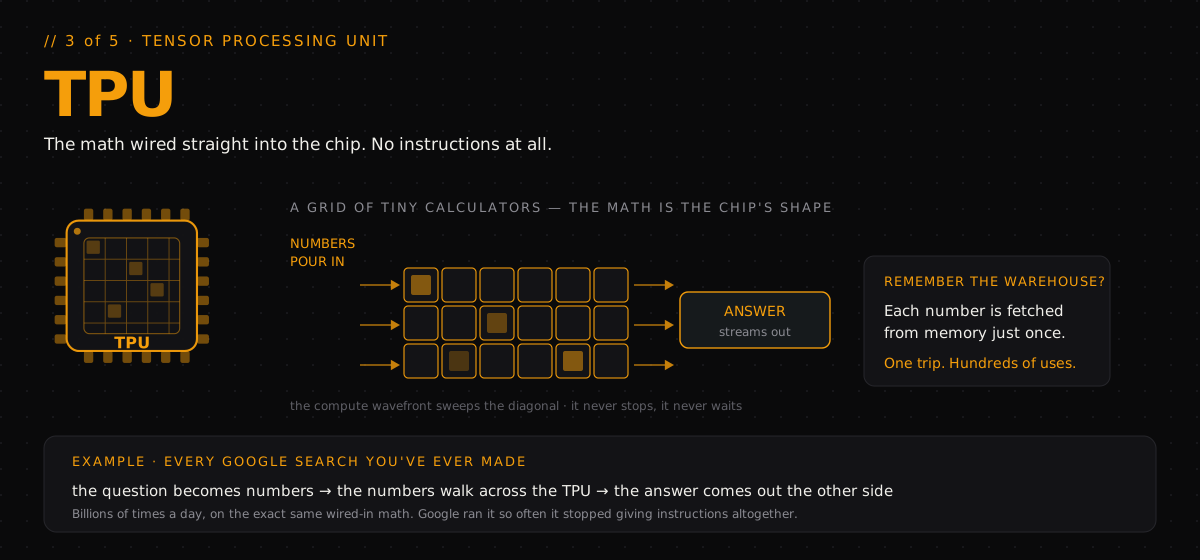
That's the TPU — the Tensor Processing Unit. The T is for tensor — just a big grid of numbers. And the idea couldn't be simpler: the math is built into the chip's shape.
No instructions. No deciding. Numbers pour in one side, flow through a grid of tiny calculators, and the finished answer streams out the other side. That's the entire chip. It can only do that one thing — but it never stops, and it never waits.
And now the warehouse pays off. Each number is fetched from memory once. One trip. Hundreds of uses.
Example: every Google search you've ever made. Each one runs through these grids — the question becomes numbers, the numbers walk across the TPU, and the answer comes out the other side. Billions of times a day, on the exact same wired-in math.
NPU — Neural Processing Unit#
Runs smaller LLMs locally on phones, PCs, and edge devices with low power consumption.
That trick was built for data centers — rooms full of chips, with all the power they could ever want.
But your phone wants AI too: face unlock, cleaning up your photos, hearing you the moment you speak. And a phone has a budget a data center never worries about — the battery.
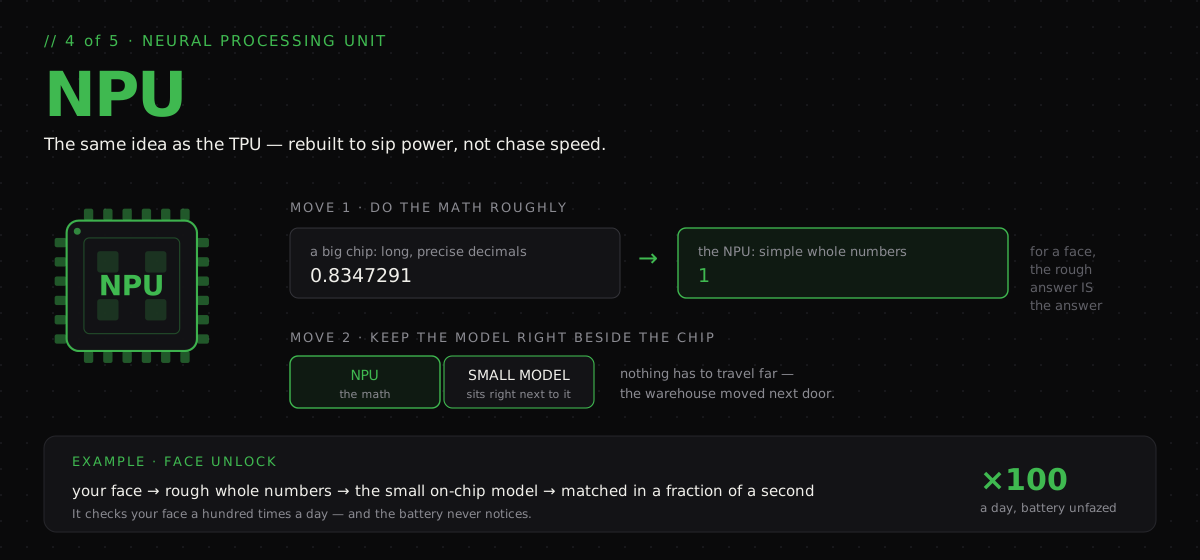
So that's the job of the NPU — the Neural Processing Unit. The N is for neural — just the kind of math AI models are made of. It's the same specialisation idea as the TPU, only rebuilt to save power instead of chasing speed. It manages that with two moves.
First, it does the math roughly. A big chip works in long, precise decimals; the NPU rounds them off to simple whole numbers. Because for recognising a face, the rough answer is the answer — and it costs a tiny fraction of the power.
Second, the model it runs is small enough to sit right beside it, so nothing has to travel far. The warehouse, in other words, moves next door.
Example: face unlock. Your phone turns your face into those rough whole numbers, runs them through the small model sitting right on the chip, and matches you in a fraction of a second. That's how it checks your face a hundred times a day — and the battery never notices.
LPU — Language Processing Unit#
A processor purpose-built for ultra-fast LLM inference, minimizing latency to generate tokens almost instantly.
And then there's the extreme one: the LPU, from a company called Groq.
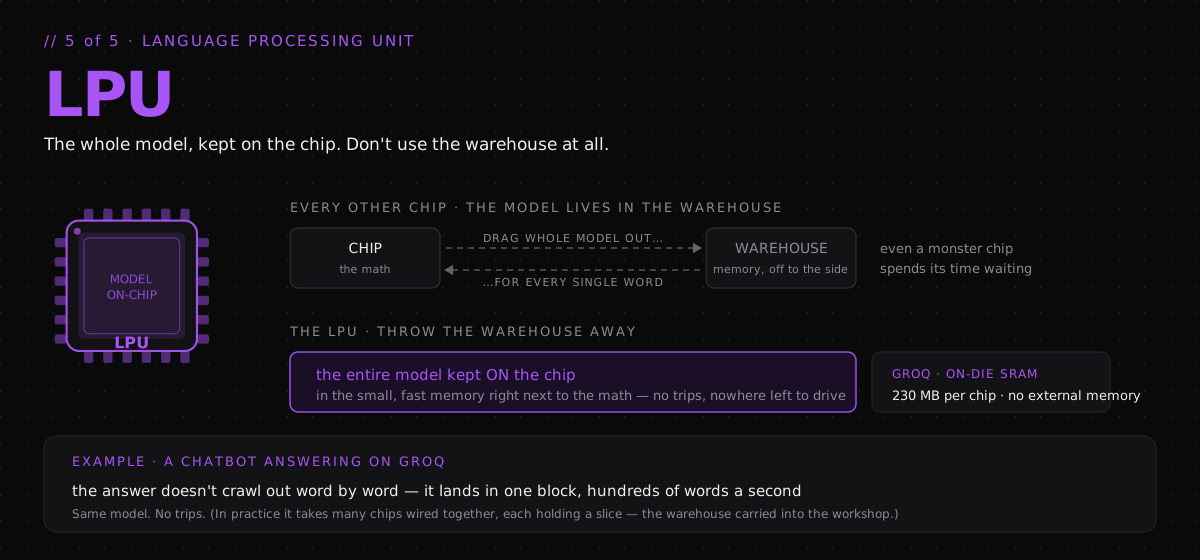
The L is for language, and it exists because of one painful fact about chatbots. Every chip so far still keeps its model in the warehouse — in memory, off to the side. And a model writing you an answer writes it one word at a time. For every single word, the whole model gets dragged out of that warehouse again.
Every word, another trip. So even a monster chip spends most of its time just waiting.
The LPU's answer is blunt: don't use the warehouse at all. Take the entire model and keep it on the chip itself, in the small, fast memory sitting right next to the math. No trips, because there's nowhere left to drive.
Groq is explicit about this: each LPU carries its memory on-die — hundreds of megabytes of fast SRAM with no external memory to reach for at all (Groq).
Example: ask a chatbot running on Groq a question. The answer doesn't crawl out word by word — it lands in one block, hundreds of words a second, faster than you can start reading. Same model. No trips.
The honest catch: "the whole model on the chip" is the idea, but on-chip memory is small — a few hundred megabytes per chip, against models that run to hundreds of gigabytes. So in practice the model is spread across many chips wired together, each holding its slice. The warehouse isn't so much abolished as it is dismantled and carried into the workshop. The trips still vanish, which is the point — it just takes a rack to pull off, not a single chip.
The part people get wrong#
Everyone asks which chip is fastest. But when AI feels slow — when a chatbot is typing back at you — it's usually not the math that's behind.
The chip is waiting for numbers to arrive from memory.

So now you know where the time actually goes. When a model writes you an answer, every word costs a tiny bit of math — and one enormous haul out of memory. Again and again, word after word. The chip isn't thinking hard. It's waiting.
The speed you feel isn't the math. It's the fetching. And that's exactly what the LPU was built to avoid.
Which means the real question was never how fast can a chip think. It's how fast can the numbers reach it.
The verdict#

In a nutshell:
- CPU — the general one. A few clever cores in every computer, able to run anything.
- GPU — thousands of simple workers. Born to draw graphics, perfect for AI's repeated math.
- TPU — Google's specialist. The math wired straight into the chip, for one job at massive scale.
- NPU — the small one in your phone. Rounding the math to spare your battery.
- LPU — the chat specialist. The whole model kept on the chip, so answers come back fast.
Never competitors. Different jobs.
Same math — five ways of doing it.
Watch the full video
@thekernelcast on YouTube

AI Agent in 100 Seconds
AI agents explained in 100 seconds — from keyword-matching chatbots to autonomous, goal-completing systems. Same chat window, completely new engine.
read the take→
AI Agent Orchestration: How AI Agents Actually Work
One request can hide dozens of steps. AI agent orchestration is the layer that plans them, picks the right tool for each, carries information between them, and verifies the result — turning a model that generates responses into a system that finishes the job.
read the take→
Why Stateless MCP Is Better for AI Agents
Stateless sounds like a word for engineers. It isn't. It's a simple idea about memory — about whether a server has to remember you. And that one thing decides whether you can grow your AI agents by just adding more machines.
read the take→