AI Agent Orchestration: How AI Agents Actually Work
One request can hide dozens of steps. AI agent orchestration is the layer that plans them, picks the right tool for each, carries information between them, and verifies the result — turning a model that generates responses into a system that finishes the job.
Ask an AI agent to research a topic, compare the results, create a presentation, and send it to your team. It sounds like one request. But behind that single prompt, the agent may need to break the task into dozens of smaller steps, choose the right tools, pass information between actions, remember what it has already done, and verify the final result.
That entire process is AI agent orchestration.
It is the layer that turns an AI model from something that generates responses into a system that can plan, coordinate tools, manage multiple agents, and complete complex tasks from start to finish.
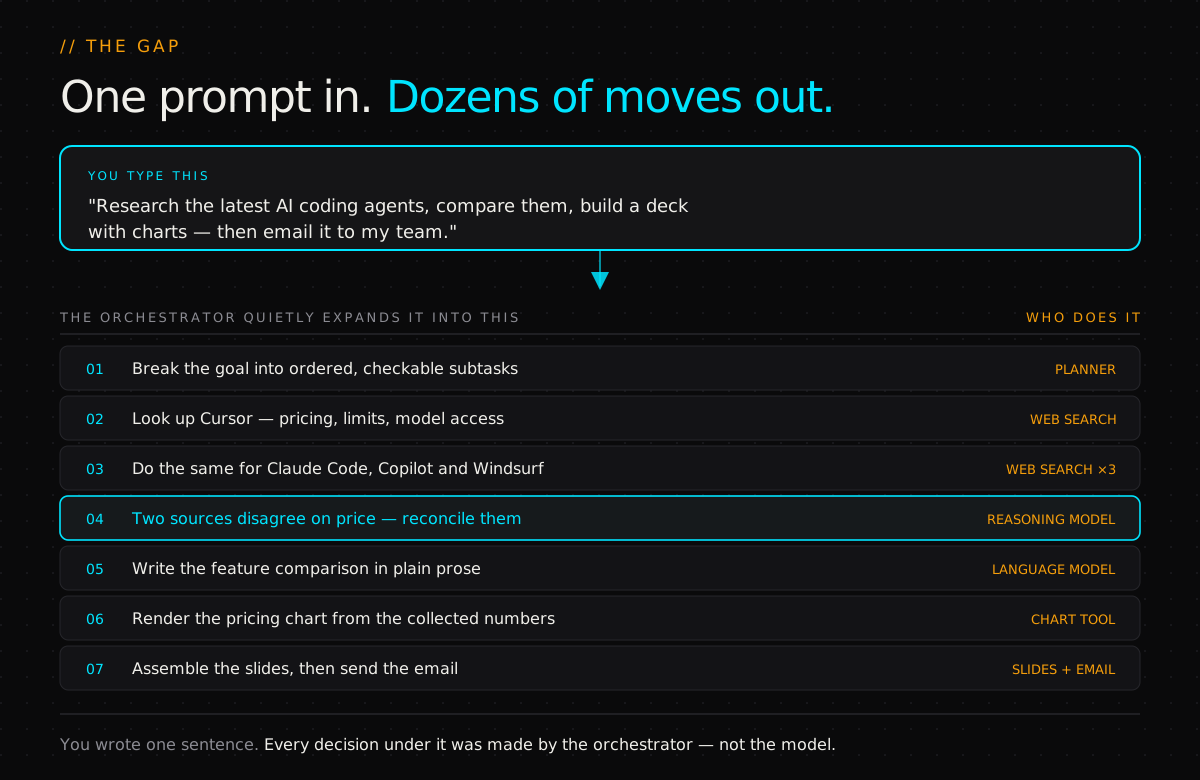
Why the model can't do this on its own#
A language model is very good at one thing: taking text in and producing good text out. Writing, summarising, reasoning about what it's given. That part is, broadly, solved.
Finishing a real job is a different problem. A real job needs order (this before that), tools (things the model cannot do with words), memory (what did we already establish?), and judgement about failure (that came back wrong — now what?).
AI agent orchestration is the layer that supplies all four. It sits above the model and runs the workflow: planning the task, picking the right tool for each step, tracking what it already knows, checking results, and delivering the finished output.
Put plainly: without orchestration, a language model answers questions. With orchestration, it becomes an agent.
The word gets used loosely — sometimes for the code you write, sometimes for a product you buy, sometimes for the abstract idea. It's all the same job. Someone has to decide what happens next, and it isn't the model on its own.
The five jobs it does#
Every orchestration layer worth the name does the same five things in a loop.
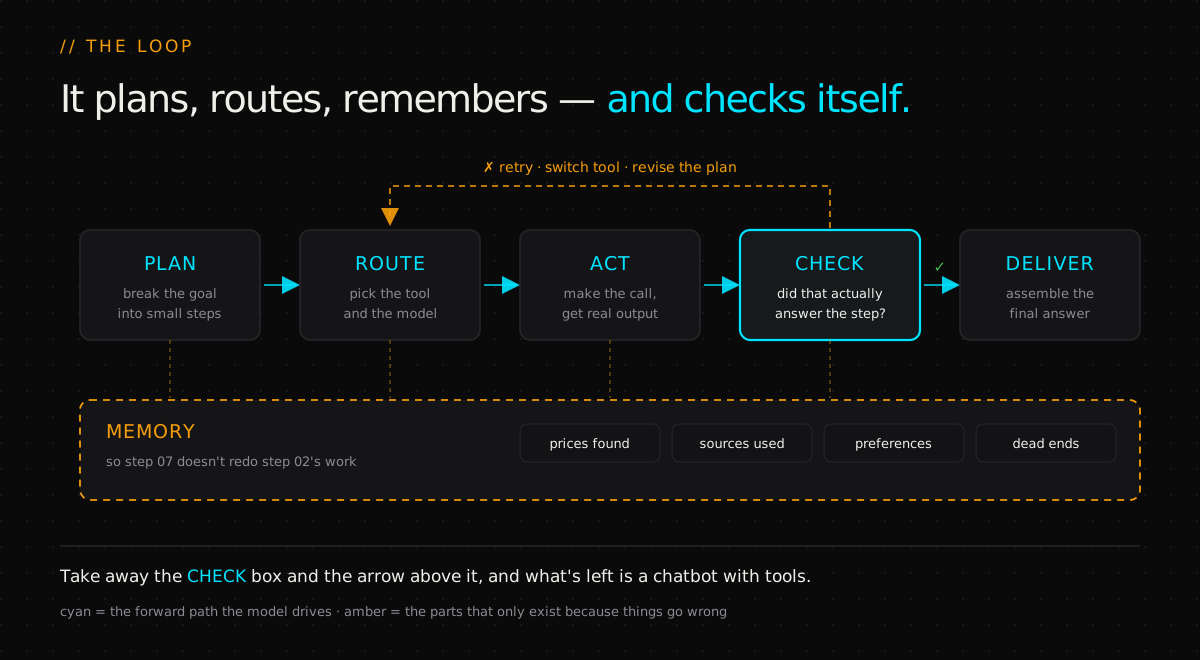
1. Planning — it never faces the whole request#
Notice what a good agent does not do: jump straight into building the presentation.
It builds a plan first. One big messy goal becomes a list of small concrete tasks — research each tool, collect the pricing, compare the features, generate the charts, build the slides, send the email.
This is called task decomposition, and it is the entire reason an agent can handle a job of that size. It never confronts the whole request at once. It only ever confronts the next step — which is a problem small enough to actually get right.
2. Routing — deciding who does the work#
Here's the part most explanations skip. The model is not doing all of this itself. For each step, it's deciding who should.
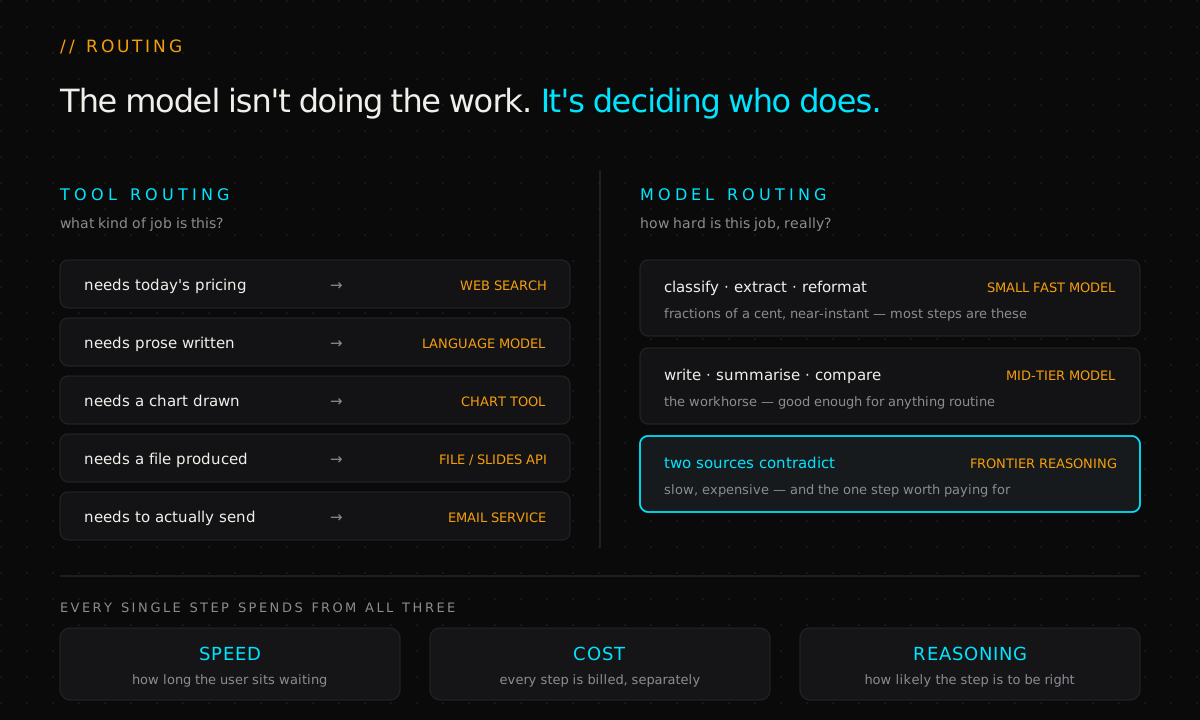
Tool routing is the obvious half. Need today's pricing? That's a web search — the model's training data is stale and it knows it. Need a comparison written? That's the language model itself. Need a chart? A visualisation tool. Need to actually send the thing? An email service. The model's job here is classification, not execution.
Model routing is the half people underrate, and it's where the economics live. Smarter systems don't send every step to the same model. A small fast model handles the simple work — classifying, extracting, reformatting — at a fraction of a cent. A heavier reasoning model gets saved for the steps that genuinely need it.
So on every single step, the system is trading speed against cost against reasoning power. Get that wrong in the expensive direction and your agent works beautifully and costs more than the person it replaced. Get it wrong in the cheap direction and it's fast, affordable, and wrong.
3. Memory — so it doesn't pay twice#
As the agent works, it accumulates things worth keeping: the pricing it found, the comparisons it drew, your preferences, and — just as usefully — the approaches that already failed.
Without memory, step 7 goes and researches something step 2 already established. That's not just wasteful, it's actively harmful: the second lookup can return a different answer, and now the deck contradicts itself.
Memory is what keeps a long workflow connected rather than being a series of unrelated tasks that happen to run back to back.
4. Evaluation — where real agents separate from demos#
Something will go wrong. A site is down. Two sources return completely different numbers. A tool comes back with garbage.
So before moving on, the orchestrator interrogates the result: Does this actually answer the step? Is it consistent with what we already know?
If the answer is no, it has options — retry the search, switch to a different tool, or go back and revise the plan itself.
That feedback loop is the entire difference between an agent and a chatbot:
A chatbot hands you the first answer it has. An agent checks it first.
5. Assembly — the part you see#
Once every step clears, the orchestrator pulls it back together: the research, the comparisons, the charts, the deck, the email.
To you it looked like one AI doing one thing. Underneath it was a plan, a dozen tool calls, a memory store, and a loop that caught its own mistakes.
Why the checking step isn't optional#
It's tempting to read that evaluation loop as a nice-to-have — polish you add once the interesting parts work. It isn't. It's load-bearing, and the reason is arithmetic.
If each step of a job succeeds independently with probability p, then an n-step job succeeds end to end with probability pn. That exponent is brutal in a way most people's intuition refuses to accept.
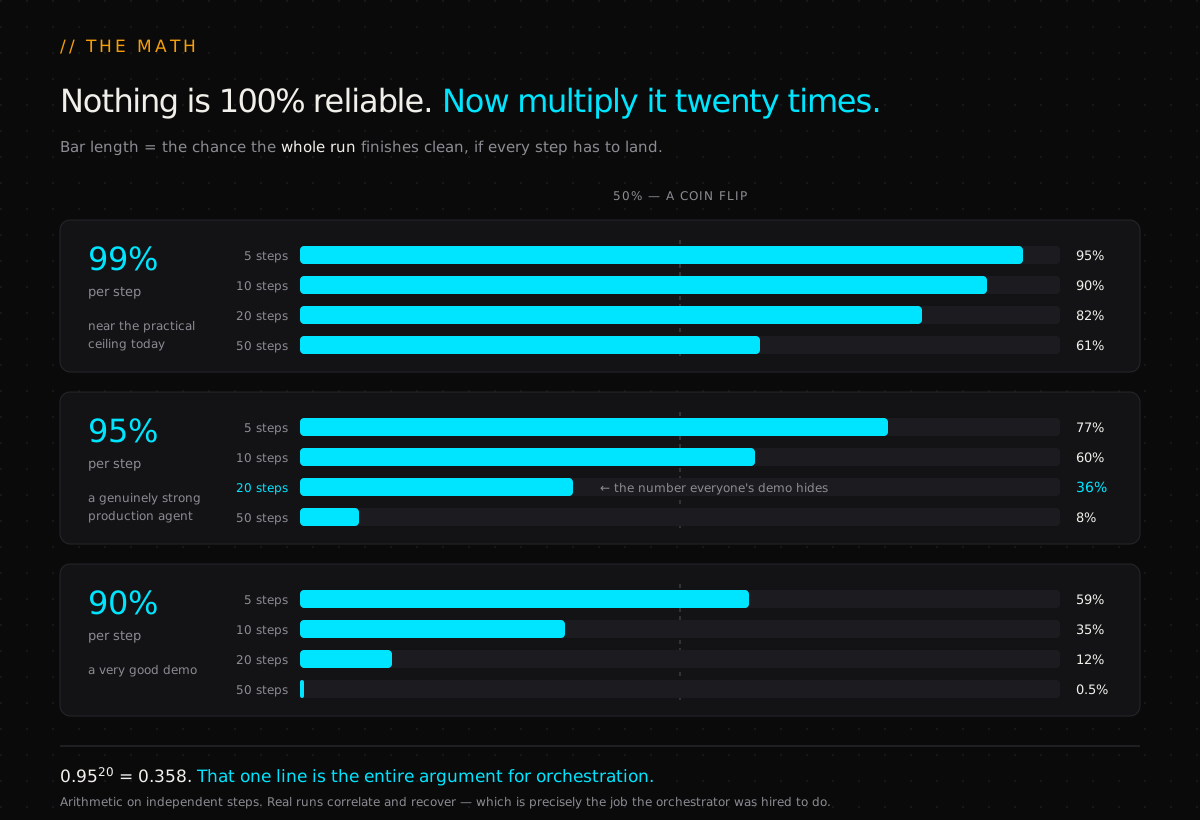
Sit with the middle row. A step that works 95 times out of 100 sounds excellent. Chain twenty of them and the whole job completes about 36% of the time. Push per-step reliability to a heroic 99% and a twenty-step run still only lands around 82% — meaning roughly one run in five fails somewhere.
Two things follow from that curve, and they explain most of what you see in this space:
Demos are structurally misleading. A three-step demo at 95% per step works 86% of the time — it'll look flawless on stage. The same system on a twenty-step production task fails most of the time. Nothing changed except the exponent.
No amount of prompt engineering fixes this. You cannot write your way out of compounding. You can only shorten the chain, verify between steps, or recover when a step fails — which is precisely the list of things an orchestrator does.
That's the honest case for orchestration. It isn't plumbing you add for tidiness. It's the only thing standing between a good model and that exponent.
The five shapes this takes#
In practice, orchestration isn't one architecture. It's a handful of recurring shapes, and nearly every production system is one of them or a combination.
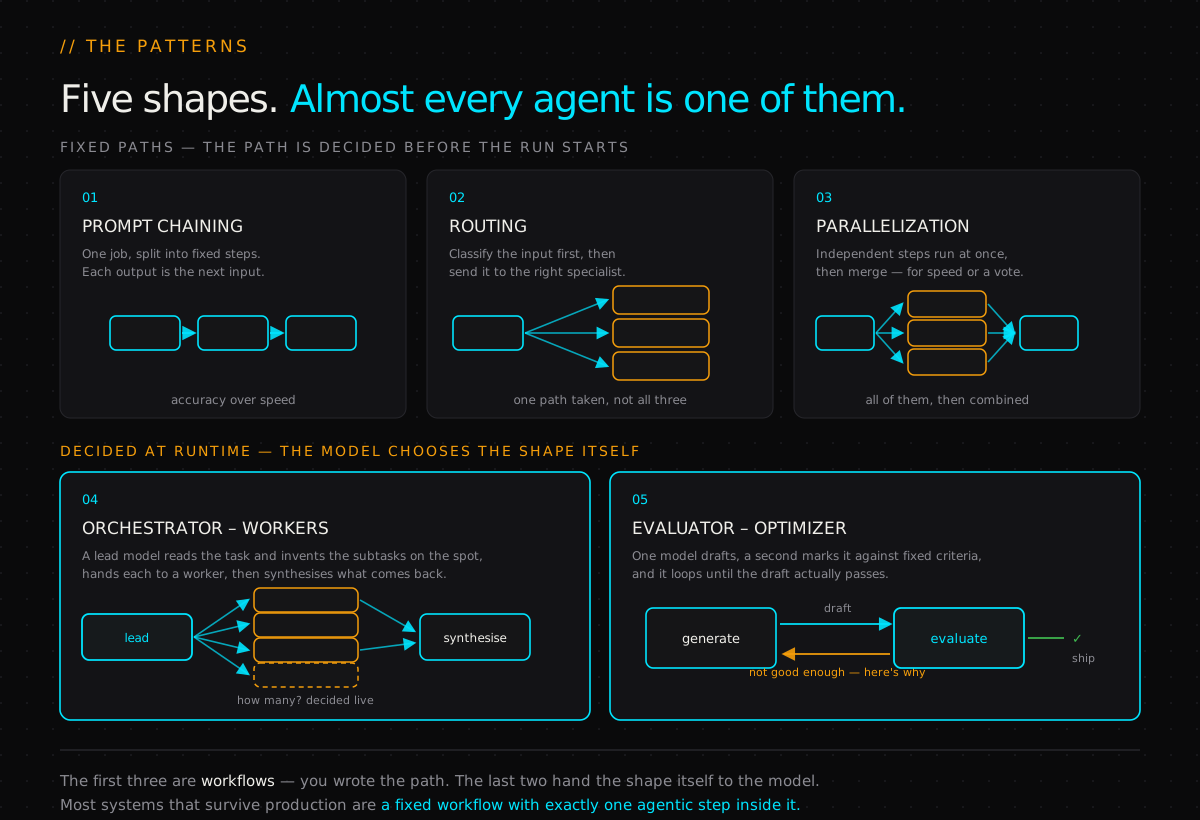
The dividing line in that diagram matters more than the five names. Anthropic draws it as workflows versus agents: in a workflow, the path through the code is fixed in advance; in an agent, the model directs its own process and decides its own tool use.
That distinction is a design decision you should make deliberately, because it's really a decision about what you're willing to give up:
- A fixed workflow is predictable, cheap to debug, and easy to test. It can only handle situations you thought of.
- A real agent handles requests nobody anticipated. It's also harder to test, harder to price, and capable of surprising you in production.
The strongest advice in this whole field is also the least exciting: start with the simplest thing that works. A single well-written prompt beats a chain. A chain beats a router. A router beats a full agent loop. Add a layer only when the simpler version has demonstrably failed — because every layer you add is another term in that exponent.
Where this goes wrong in practice#
Four failure modes account for most of the pain, and none are about model quality.
The plan is wrong and everything downstream inherits it. Bad decomposition is unrecoverable by later steps. If the plan never included "check whether these tools are even comparable," no amount of careful execution rescues it.
The context window rots. Long runs accumulate history until the useful signal is buried in transcript. Memory isn't just storage — it's deciding what to forget, and it's the thing that quietly degrades a twenty-step run.
The evaluator is too agreeable. Asking a model "is this good?" and letting it grade its own homework reliably returns yes. Evaluation only works against criteria specific enough to fail — which usually means checking a value, a format, or a second source, not asking for a vibe.
Nobody costed the loop. Retries multiply spend. An agent that retries three times on a frontier model for every flaky step is a bill nobody modelled. Routing and step limits are cost controls as much as design choices.
The tooling, as of 2026#
Three layers, and they're often confused.
Frameworks give you the loop, state handling and retries so you don't rebuild them. LangGraph is the common pick for stateful long-running graphs where persistence matters. CrewAI gets a multi-agent prototype up fastest. The OpenAI Agents SDK, Google's ADK, Anthropic's Claude Agent SDK and Microsoft's Agent Framework are each the shortest path inside their own ecosystem. They differ far less in what they can express than in how much they hide from you when something breaks.
Platforms don't give you the loop — they've already built it. Everything this post has described is assembled for you, and your job is to configure it rather than write it. YourGPT is the clearest example of the category: its AI Studio canvas is a workflow builder made of exactly these parts — branching for the plan, API calls out to your own systems for the tool steps, memory carried between them, and a handoff to a human for the case where the agent's own checks fail. You give up fine control over the loop in exchange for never having to build or maintain it. That trade is the right one far more often than engineers like to admit — particularly when the team who owns the workflow isn't the team who'd own the code.
Protocols standardise the connection to tools. The Model Context Protocol is the one that won: one interface, so any MCP tool works with any MCP agent instead of every pairing needing custom glue. Anthropic donated it to the Agentic AI Foundation under the Linux Foundation in December 2025 — co-founded with Block and OpenAI, with Google, Microsoft and AWS supporting — which makes it vendor-neutral infrastructure rather than one company's house standard.
Worth being clear about the boundary: MCP is not orchestration. It makes the targets uniform. Deciding which target to call, in what order, and what to do when the answer comes back wrong is still entirely your problem. (If you want the architectural detail on how MCP handles state, that's a whole story on its own.)
And you don't need any of it to start. The core loop is small enough to write by hand — call the model, let it pick a tool, run the tool, feed the result back, check it, repeat until done or until you hit a step limit. Building that yourself once teaches you where your system breaks, which is exactly the knowledge a framework's abstractions will otherwise keep from you.
The verdict#
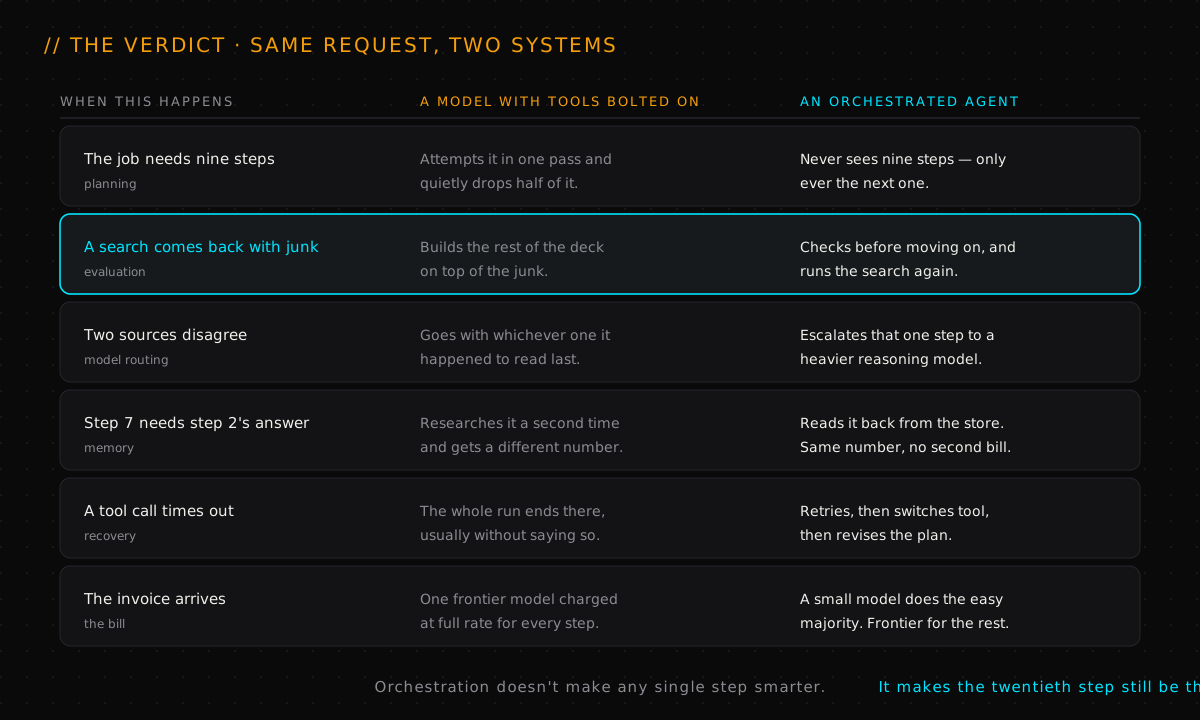
So — what is AI agent orchestration, in one paragraph?
It's the layer that turns a model that talks into a system that finishes. It plans, so the model only ever faces the next step. It routes, so each step goes to the tool and the model that fit it. It remembers, so work isn't repeated or contradicted. It checks, so a bad result doesn't get built on. And it recovers, so one dead website doesn't take down the run.
None of that makes the underlying model any smarter. That's rather the point. The model was already good enough — what was missing was everything around it.
The next time a single sentence produces a finished deck in your inbox, the impressive part isn't that the AI wrote good slides. It's that a plan, a dozen tool calls, a memory store and a loop that caught its own mistakes all ran in sequence, and you never saw any of it.
Frequently asked questions#
What is AI agent orchestration?#
It's the control layer that sits above a language model and runs a whole job end to end. It breaks a goal into ordered steps, decides which tool and which model handles each one, keeps a memory of what's been established, checks each result before moving on, and retries or re-plans when something fails. The model supplies the reasoning for individual steps; the orchestrator decides what the steps are.
How does AI agent orchestration work?#
It runs a loop: plan → route → act → check → deliver. Plan decomposes the goal into small checkable subtasks. Route picks the tool and often the model for each. Act executes. Check asks whether the result actually answered the step and is consistent with what's already known — and if not, it retries, switches tool, or revises the plan. Only when every step clears does it assemble the final output.
What's the difference between AI agent orchestration and workflow automation?#
Who decides the path. In classic workflow automation a human defines every branch in advance and the system follows it. In agent orchestration the model decides at least part of the path at runtime — which subtasks exist, which tool fits, whether a result is good enough. Flexibility is the gain; predictability is the cost. Most production systems that actually last are a fixed workflow with one genuinely agentic step inside, not an agent all the way down.
What are the main AI agent orchestration patterns?#
Five cover nearly everything. Prompt chaining — fixed sequential steps, each output feeding the next. Routing — classify first, then send to the specialist handler. Parallelization — run independent steps at once and merge, for speed or for a vote. Orchestrator–workers — a lead model invents the subtasks at runtime, delegates, then synthesises. Evaluator–optimizer — a generator and a critic loop until the draft passes. The first three are fixed workflows; the last two hand the shape of the work to the model.
What's the difference between an AI agent and a chatbot?#
The feedback loop. A chatbot hands you the first answer it has and whether it's right is your problem. An agent checks its own work before continuing, and when a result fails the check it retries, switches tool, or re-plans. The second difference is reach: a chatbot returns text; an agent calls tools that change things — running searches, writing files, sending mail.
What is the best AI agent orchestration framework?#
There isn't one, and the honest answer is that it depends what you're orchestrating. LangGraph for stateful long-running workflows needing persistence. CrewAI for the fastest multi-agent prototype. The OpenAI Agents SDK, Google ADK and Claude Agent SDK for the path of least resistance inside their own ecosystems. Microsoft's Agent Framework for .NET and Azure. Start without one, hand-roll the loop until you know your own failure modes, and adopt a framework when state management genuinely starts to hurt.
What is model routing in AI agents?#
Using different models for different steps of the same job. Classifying, extracting and reformatting go to a small fast model at a fraction of a cent. Writing and comparing go to a mid-tier workhorse. Genuinely hard steps — resolving a contradiction, making a judgement call — get escalated to a frontier reasoning model, which is affordable precisely because it's used rarely. Every step is a trade between speed, cost and reasoning power.
Why do multi-agent AI systems fail?#
Because errors compound. At 95% per-step reliability a 20-step run finishes clean only ~36% of the time (0.95²⁰ = 0.358). Even at 99% per step, 20 steps only reaches ~82%. Prompt engineering cannot fix an exponent. The only real levers are shorter chains, verification between steps, and genuine recovery when a step fails — which is why a three-step demo looks flawless and the same system falls over on a twenty-step task.
Do I need a framework to build an AI agent?#
No — and starting without one is usually better. The core loop is small: call the model, let it pick a tool, run the tool, feed the result back, check it, repeat until done or until a step limit trips. Writing that by hand teaches you where your system actually breaks, which is knowledge a framework's abstractions will otherwise hide. Adopt one when persistence, retries or multi-agent handoffs start costing real time.
Is MCP an orchestration framework?#
No. The Model Context Protocol standardises how an agent connects to tools — one interface, so any MCP tool works with any MCP agent. Orchestration is the layer above that decides which tool to call, in what order, and what to do when the result is wrong. MCP makes the targets uniform; it doesn't do the choosing. Anthropic donated it to the Agentic AI Foundation under the Linux Foundation in December 2025, so it's vendor-neutral infrastructure now rather than one company's standard.
If the underlying idea — that an agent acts rather than just replies — is still new, start with AI agents in 100 seconds. If you want to see what orchestration looks like when two real assistants are compared side by side, try OpenClaw vs Hermes Agent.
- 01Anthropic — Building effective agents (the workflow patterns, and when not to use an agent)
- 02Anthropic — donating the Model Context Protocol and establishing the Agentic AI Foundation
- 03Linux Foundation — formation of the Agentic AI Foundation, anchored by MCP
- 04Tallyfy — the compounding-reliability math on a 20-step agent run
- 05LangChain — the best AI agent frameworks in 2026
Watch the full video
@thekernelcast on YouTube

AI Agent in 100 Seconds
AI agents explained in 100 seconds — from keyword-matching chatbots to autonomous, goal-completing systems. Same chat window, completely new engine.
read the take→
Why Stateless MCP Is Better for AI Agents
Stateless sounds like a word for engineers. It isn't. It's a simple idea about memory — about whether a server has to remember you. And that one thing decides whether you can grow your AI agents by just adding more machines.
read the take→
OpenClaw vs Hermes Agent: Which Should You Pick?
OpenClaw and Hermes Agent are 2026's top personal-AI-assistant platforms — both well-funded, both NVIDIA partners, built on completely different stacks. We score them across five technical dimensions and call an honest verdict.
read the take→